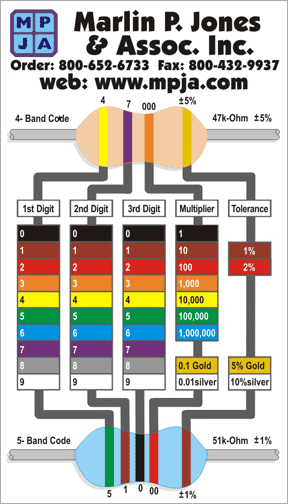
I shut my RPi down and unplugged it to hook up the circuit. The resistors are tiny and are marked but I wanted to see if I could read them. I found this page with an explanation of reading the color codes but there are many more pages on the internet.

There doesn't seem to be any gold or silver line to place to the right but in the above orientation it seems correct. The orange looks brown but if I ASSUME it is orange, which could make an ASS out of U and ME and fry my RPi, then we have rings in order orange, orange, black, black, brown.

I'm not sure what the last ring means because it is not gold or silver but this should read as 330 Ohms. I'm trusting that they labeled the strip correctly and everything goes OK.

And it did! I got my LED to turn on in the Python shell on the terminal like the written instructions say. I then followed the video instructions and typed in the program to make the LED blink and finally the one that asks how many times it should blink and it all worked! I had to jiggle my connectors on the pins to get it to light because I think it kept moving but it still worked! I also edited the program to make it blink faster.

This is my first circuit since I was a child and my first computer controlled circuit! I'm so excited.I also found a better graphic to read resistors here. It includes the colors brown & red for the right band which makes sense on my resistors.


No comments:
Post a Comment
Thanks for leaving a comment! I'll get back to you ASAP but I've got a busy life